Article partially generated by artificial intelligence.
TL;DR: OWASP Top 10 is the list of the most serious risk categories in web applications, published by the OWASP Foundation and used as a reference by security teams and auditors. Apps built with AI, for example in Lovable on a Supabase database, usually fail in the same places the OWASP Top 10 describes, above all in access control. Below is a 12-point application security checklist to run before an app starts handling customer data, or before an auditor asks about it in a company covered by NIS2.
Broken access control is the number one category in the OWASP Top 10.
The Cloud Security Alliance found that 62% of AI-generated code solutions contain design flaws or known vulnerabilities.
Apps that call a language model face extra risks, covered by a separate OWASP Top 10 for LLM applications.
A checklist does not replace penetration testing, but it can remove the most common mistakes in a day.
What is the OWASP Top 10 and why does it fit AI-built apps?
The OWASP Top 10 is published by the OWASP Foundation, a non-profit focused on application security. It describes the ten risk categories that most often lead to incidents in web applications, from broken access control and security misconfiguration to vulnerable components, injection and missing logging.
Vibe-coded apps do not have new kinds of flaws. They have the same ones, more often, because an AI model writes code that works and has to be asked for security. That makes the OWASP Top 10 a good backbone for a checklist. For why such apps appear in companies and fall under NIS2, see why shadow AI apps end up in NIS2 scope.
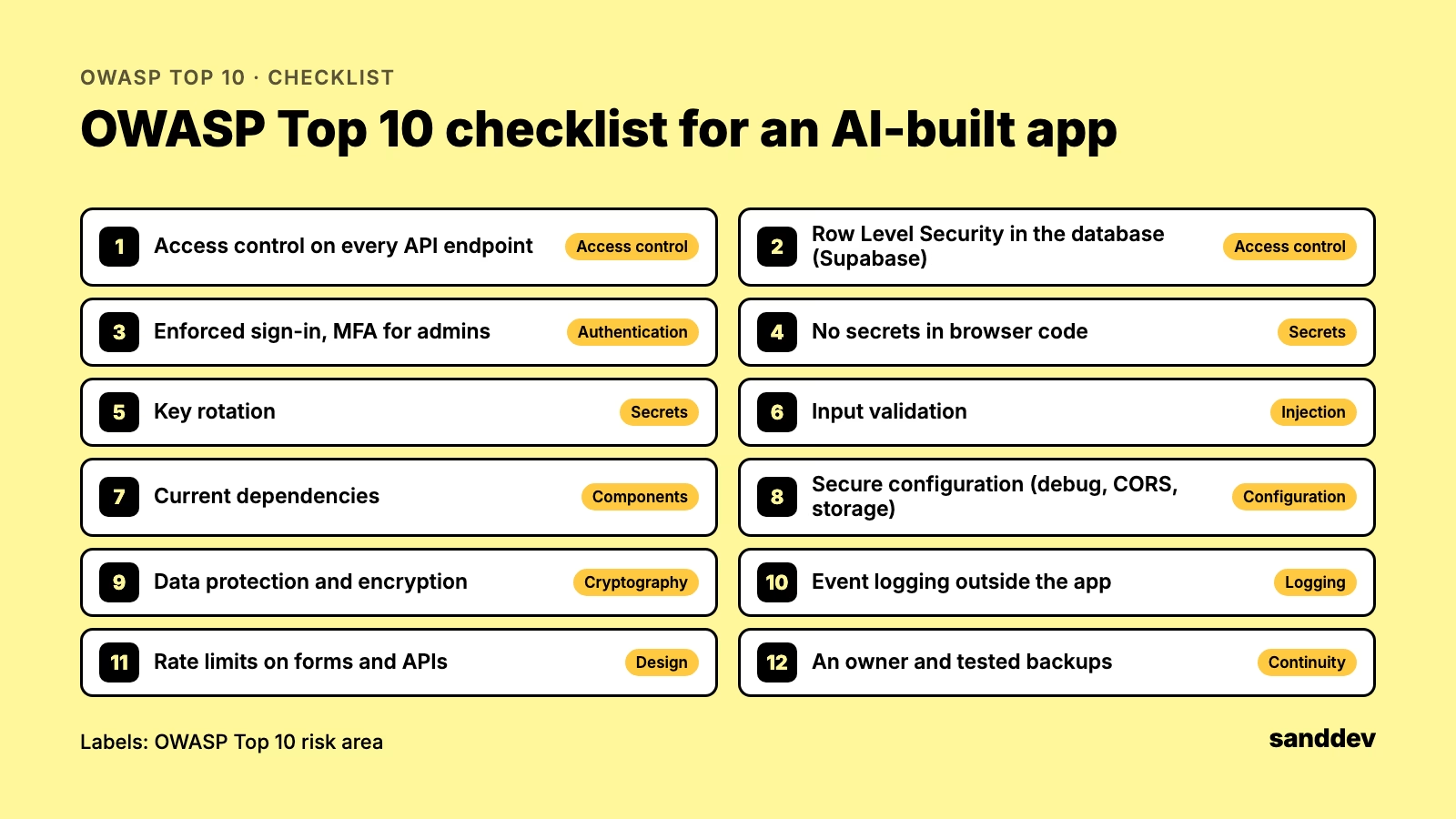
OWASP Top 10 application security checklist: 12 points
Access control on every API endpoint. Every request checks on the server that the user may see the data; hiding buttons in the interface is not enough.
Database access rules. In Supabase, every table holding data has Row Level Security enabled and policies that restrict reads and writes.
Enforced sign-in. No page with data is reachable without signing in, and administrators use multi-factor authentication.
No secrets in browser code. Admin-level keys, such as the Supabase service_role key, never reach the frontend or a public repository.
Key rotation. Keys that may have reached the code or repository history have been changed.
Input validation. Database queries are parameterised, and user input is checked on the server.
Current dependencies. Libraries are on versions without known critical vulnerabilities, and someone checks regularly.
Secure configuration. Debug mode is off, the CORS policy does not admit any domain, and storage buckets are not public.
Data protection. The app stores only the data it needs, and connections and sensitive data are encrypted.
Event logging. The app records sign-ins, permission changes and errors, and logs are kept outside the app itself.
Abuse limits. Forms and APIs have rate limits so they cannot be used to pull data in bulk.
Ownership and backups. The app has an owner in the business, sits in the application inventory and has backups someone has actually restored.
Supabase row level security and Lovable: what to watch
Lovable and similar tools often connect an app to a Supabase database. It is convenient, but it carries a specific risk: the database’s public key is visible in browser code by design, so all data protection rests on Row Level Security rules. If the rules are missing or too broad, anyone who knows the app’s address can read the tables. Supabase’s documentation explains how to configure Row Level Security. Check this first; it is the most common source of leaks in AI-built apps.
Apps that use a language model: OWASP Top 10 for LLM applications
If the app itself calls a language model, for example to answer customers or summarise documents, it adds the risks described in the OWASP Top 10 for LLM Applications: prompt injection, sensitive data disclosure in model output and excessive agency of the tools the model can use. Google Trends shows interest in this list rising fast. The minimum is to separate data from instructions, limit permissions and avoid sending the model data it does not need.
Web application security checklist done: what comes next?
A checklist catches the most common mistakes, but it does not replace a code review or a penetration test, in which a specialist tries to break into the app the way an attacker would. For apps that handle customer data or connect to company systems, plan both. In a company covered by NIS2, the review result is also evidence for the auditor. If an outside vendor built the app, use the same checklist when you assess them; see third-party risk management for software vendors.
How to run the OWASP Top 10 checklist in a day
A review of a small AI-built app can fit into one working day if it is prepared in advance. You need access to the code or to the project in the tool it was built with, access to the database and hosting dashboards, and an hour with the person who built the app.
Morning: talk to the builder. What the app is for, what data it processes, who uses it and what systems it connects to.
Late morning: configuration. Table access rules, authentication, public storage buckets, environment variables and keys. In Supabase, the built-in Security Advisor flags tables without Row Level Security.
Afternoon: code and dependencies. Search for secrets, check that every API endpoint verifies permissions on the server, and review libraries for known vulnerabilities.
End of day: a short report with three lists: fix now, fix within a month, and decide, meaning whether to hand the app to IT, rebuild it or switch it off.
Common findings and how to fix them
The same problems keep appearing in AI-built apps. Tables without Row Level Security are fixed by enabling RLS and adding policies that let users read only their own records. An admin-level key in browser code must be rotated at once, and operations that need it moved to the server. API endpoints that take a record ID and return data without checking that it belongs to the signed-in user are a textbook case of broken access control, the first category of the OWASP Top 10; the fix is a server-side check. Missing rate limits are solved at the hosting platform or API gateway level.
Most of these fixes take hours, not weeks. The harder part is often the organisational decision: whether a tool that started as an experiment and now serves hundreds of customers should be rebuilt and taken over by IT. That decision should be made deliberately, with the business owner involved, not after the first incident.
Penetration testing: when a checklist is not enough
Commission a penetration test when the app processes personal data of many customers, handles payments, connects to production systems or is publicly reachable by anyone. In those cases the checklist is a starting point, not the finish line. A tester chains small weaknesses into a realistic attack, which no checklist does. Fix the checklist findings first and then order the test, so the report focuses on the harder issues rather than gaps you could have found yourself. In a company covered by NIS2, test results and a list of fixes are also strong evidence for the auditor. When choosing a tester, ask about scope, methodology, a sample report and whether a retest after fixes is included.
An OWASP Top 10 review of your AI-built app, with fixes
Sanddev reviews AI-built apps against the OWASP Top 10, fixes what it finds and prepares a board-level report. See what a full production-readiness review involves.
Frequently asked questions
What is the OWASP Top 10?
The OWASP Top 10 is a list of the ten most serious risk categories in web applications, published by the OWASP Foundation. Security teams, developers and auditors use it as a reference; broken access control is ranked first.
Are apps built with Lovable secure?
They can be, if someone checks the configuration. Lovable apps often use Supabase, and data security then depends on Row Level Security rules. Without them, anyone who knows the app’s address can read the tables.
How do I check whether Supabase row level security is set up?
Check that every table holding data has Row Level Security enabled with policies restricting reads and writes, and that the service_role key has not reached browser code or a repository. Supabase’s documentation describes the setup.
Does an application security checklist replace penetration testing?
No. A checklist based on the OWASP Top 10 catches the most common mistakes, while a penetration test probes the app the way an attacker would and finds issues a checklist does not cover.
What is the difference between the OWASP Top 10 and the OWASP Top 10 for LLM applications?
The OWASP Top 10 covers risks in web applications. The OWASP Top 10 for LLM applications covers apps that use language models, including prompt injection and sensitive data disclosure in model output.